



Discover app development best practices for UI/UX including design principles, process, tools, cost factors, and 2025 trends for better engagement.
What Are the App Development Best Practices for UI/UX?
User Interface (UI) and User Experience (UX) design play a critical role in the success of any mobile or web application. No matter how powerful your backend or feature-rich your app is, poor UI/UX can lead to low engagement, high uninstall rates, and negative reviews.
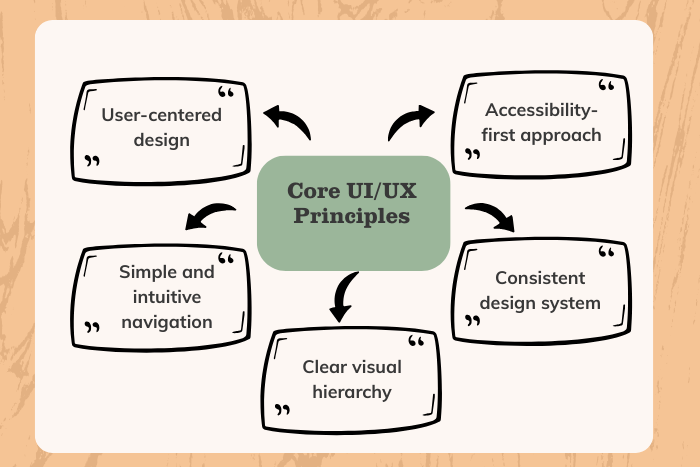
So, what are the app development best practices for UI/UX? The answer lies in combining user-centered design principles, intuitive navigation, responsive layouts, accessibility standards, performance optimization, and continuous testing.
Modern applications must deliver seamless, adaptive, and engaging digital experiences across multiple devices, screen sizes, and user environments. From mobile-first design strategies to AI-driven personalization, UI/UX best practices have evolved significantly in 2025.
In this complete guide, we explore UI/UX design best practices for app development, including essential features, structured development processes, recommended tools, cost considerations, and emerging trends shaping the future of digital product design.
Why UI/UX Best Practices Are Important in App Development
Strong UI/UX design directly impacts user engagement, retention, and business growth. Implementing app development best practices for UI/UX ensures:
Improved user satisfaction and loyalty
Higher app store ratings and reviews
Reduced bounce and uninstall rates
Faster task completion and usability
Better accessibility and inclusivity
Increased conversion and revenue rates
Users expect intuitive design, fast load times, and minimal friction. Apps that fail to meet these expectations struggle to compete in crowded marketplaces.
By prioritizing user-centered design, businesses can create meaningful digital experiences that align with user behavior and expectations.
Types of UI/UX Design Solutions
Different apps require tailored UI/UX strategies. Our UI/UX development services include:
Mobile App UI/UX Design – Optimized for Android and iOS platforms.
Responsive & Adaptive Design – Layouts that adjust to various screen sizes.
Web App UX Optimization – Seamless cross-browser and device experiences.
Redesign & UX Audit Services – Improving existing apps through research-driven design improvements.
Accessibility-Focused Design – Inclusive interfaces following WCAG guidelines.
Interaction & Micro-Animation Design – Enhancing user engagement through motion design.
Design System Development – Creating scalable UI libraries and reusable components.
Selecting the right solution depends on platform goals, user demographics, and product vision.
Key Features of Effective UI/UX in App Development
To follow best practices, UI/UX design should include:
Intuitive navigation structure
Consistent visual hierarchy
Clear typography and readable text
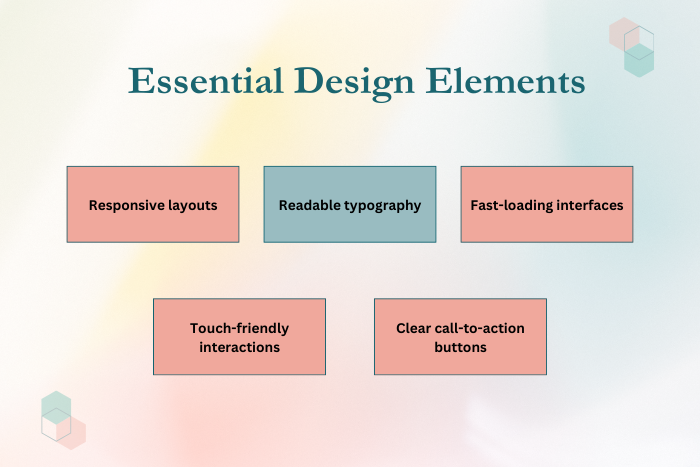
Responsive and adaptive layouts
Fast loading interfaces
Minimalistic and clutter-free design
Accessible color contrast
Interactive feedback mechanisms
Clear call-to-action buttons
Optimized onboarding experience
Advanced UI/UX features may include AI-based personalization, gesture-based navigation, dark mode support, and cross-device synchronization.
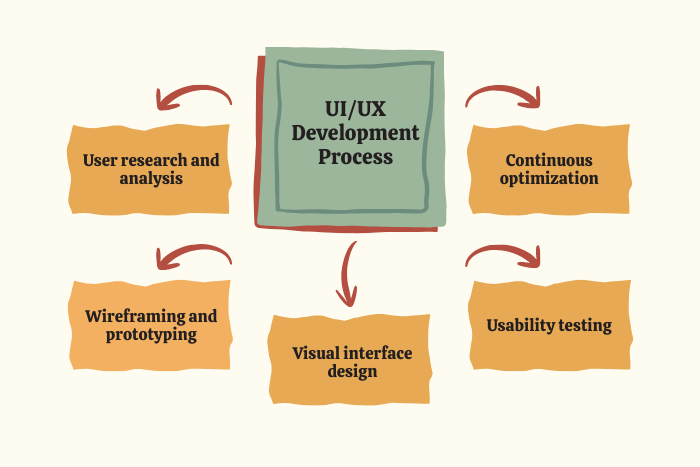
UI/UX Development Process
We follow a structured design-driven development process:
User Research & Analysis
Conduct user persona creation, behavioral research, and competitor analysis.Information Architecture Planning
Define content structure and user flow diagrams.Wireframing & Prototyping
Build low- and high-fidelity prototypes for validation.Visual UI Design
Develop brand-aligned color schemes, typography, and layouts.Usability Testing
Test prototypes with real users and refine interactions.Development Collaboration
Ensure seamless implementation with frontend teams.Performance & Accessibility Optimization
Improve speed, responsiveness, and compliance.Continuous Testing & Iteration
Monitor analytics and refine user journeys post-launch.
Technology Stack for UI/UX App Development
Choosing the right tools enhances design quality and scalability.
- Design Tools: Figma, Adobe XD, Sketch
- Prototyping Tools: InVision, Marvel
- Frontend Frameworks: React Native, Flutter, SwiftUI
- Web Technologies: React.js, Angular, Vue.js
- Testing Tools: Hotjar, UXCam, Google Analytics
- Accessibility Tools: Axe, Lighthouse
- Design Systems: Material Design, Human Interface Guidelines
The tech stack varies based on project requirements and platform selection.

Cost Factors for UI/UX Optimization
UI/UX design costs depend on multiple variables:
App complexity and number of screens
Custom animations and micro-interactions
User research depth
Accessibility compliance
Design system creation
Platform support (iOS, Android, Web)
Usability testing requirements
Estimated UI/UX design cost ranges:
Basic MVP Design: $5,000 – $15,000
Medium Complexity App: $15,000 – $40,000
Advanced Enterprise-Level UX: $40,000+
Investing in strong UI/UX early reduces costly redesigns later.
Latest UI/UX Trends in App Development (2025)
To remain competitive, apps must integrate emerging design innovations:
AI-driven personalization
Voice and gesture-based interactions
Dark mode and dynamic theming
Micro-interactions and animation-driven UX
Inclusive and accessibility-first design
Minimalistic and clean layouts
AR/VR immersive interfaces
Data-driven UX optimization
Staying ahead of trends ensures better user engagement and competitive advantage.
Why Choose Us for UI/UX App Development?
We combine creativity, research, and technical precision to deliver exceptional digital experiences.
User-first design methodology
Experienced UI/UX designers and researchers
Cross-platform design expertise
Data-driven design decisions
Accessibility-compliant interfaces
Performance-optimized layouts
Transparent workflow and collaboration
Post-launch UX optimization support
We don’t just design interfaces — we craft intuitive digital journeys that convert and retain users.
Ready to improve your app’s UI/UX experience?
Contact us today for a free design consultation.
Let’s create a user experience that drives growth.
Key Points :
- User-centered design approach focusing on research, personas, and usability testing to improve engagement and retention.
- Core UI/UX best practices including intuitive navigation, responsive layouts, accessibility standards, and visual hierarchy.
- Structured UI/UX development process from wireframing and prototyping to testing and continuous optimization.
- Modern technology stack and design tools such as Figma, React Native, Flutter, and UX analytics platforms.
- Cost and complexity breakdown based on app size, custom animations, research depth, and cross-platform requirements.
- Latest 2025 UI/UX trends including AI personalization, dark mode, micro-interactions, accessibility-first design, and AR/VR interfaces.
FAQ's
Focus on user-centered design, intuitive navigation, responsive layouts, accessibility, and continuous usability testing.
It directly affects user retention, engagement, and app store ratings.
Depending on complexity, 3–8 weeks for MVP design and longer for enterprise-level projects.
Common tools include Figma, Adobe XD, Sketch, InVision, and UX analytics platforms.
Costs range from $5,000 to $40,000+ based on app complexity and research depth.
UI focuses on visual elements and interface design, while UX focuses on overall user journey and experience.
Through usability testing, heatmaps, session recordings, A/B testing, and user feedback analysis.

